📱 Tech Intelligence | iOS 27 · June 2026
Apple Siri
Just Got
Scary
Smart.
Let’s be real — for years, Siri was the butt of every tech joke. Ask it to set a reminder and it would open Safari. Ask it anything remotely complicated and you’d get a web search. People literally stopped using it and switched to Google Assistant or ChatGPT instead.
Then came iOS 27, and Apple flipped the script entirely. The new Siri isn’t a voice interface bolted onto search. It’s a full-blown AI assistant built on a large language model, designed to understand context, reason through tasks, and actually do things inside your apps — not just look things up.
This is the AI upgrade Apple needed to stay relevant in a world where ChatGPT and Gemini are on everyone’s phones. And honestly? Based on what’s been shown so far, it’s not just catching up — in some areas, it’s doing things competitors haven’t cracked yet.
What Actually Changed This Time
Siri in iOS 27 isn’t a software update — it’s a full architectural rebuild. Apple basically threw out the old Siri and started over, this time with an LLM (large language model) at its core. That’s the same kind of technology powering ChatGPT and Google Gemini, but Apple’s implementation has a few key differences that matter a lot.
The biggest one? It runs primarily on your device. Apple calls this the “Personal Intelligence” layer. Your messages, emails, calendar, photos, health data — Siri processes all of that locally on your iPhone, using Apple Silicon. Nothing leaves your phone unless you explicitly need a more complex query answered, and even then, Apple routes it through Private Cloud Compute, which they claim leaves no data logs.
Old Siri (pre-iOS 17): Voice → Intent Recognition → Static Response or Web Search. It understood commands but not context. You had to phrase things exactly right or it broke.
New Siri (iOS 27): Voice or Text → LLM Reasoning Engine → Cross-App Action or Contextual Response. It understands what you mean, not just what you said. It holds context across a conversation. It can take actions inside apps on your behalf — without you needing to open a single app.
The other big change is that Siri now has what Apple calls “App Intents” at a deep system level. Third-party apps can register specific capabilities with Siri — so it can actually send a message in WhatsApp, create a task in Things, pay a bill in your banking app, or edit a photo in Lightroom. Not just launch the app. Actually do the thing.
Why This Matters More Than Any Previous Siri Update
Every year at WWDC, Apple would announce “significant improvements to Siri.” And every year, power users would shrug because nothing felt fundamentally different. The wake word still got triggered accidentally. Multi-step requests still failed. Complex questions still got punted to Safari.
iOS 27 is different because Apple changed what Siri fundamentally is — not just how well it executes the old approach. That’s the distinction that matters for anyone who’s tried every Siri update and given up.
The Six Features That Are Genuinely New
Let’s skip the marketing language and go feature by feature — what’s actually different in daily use.
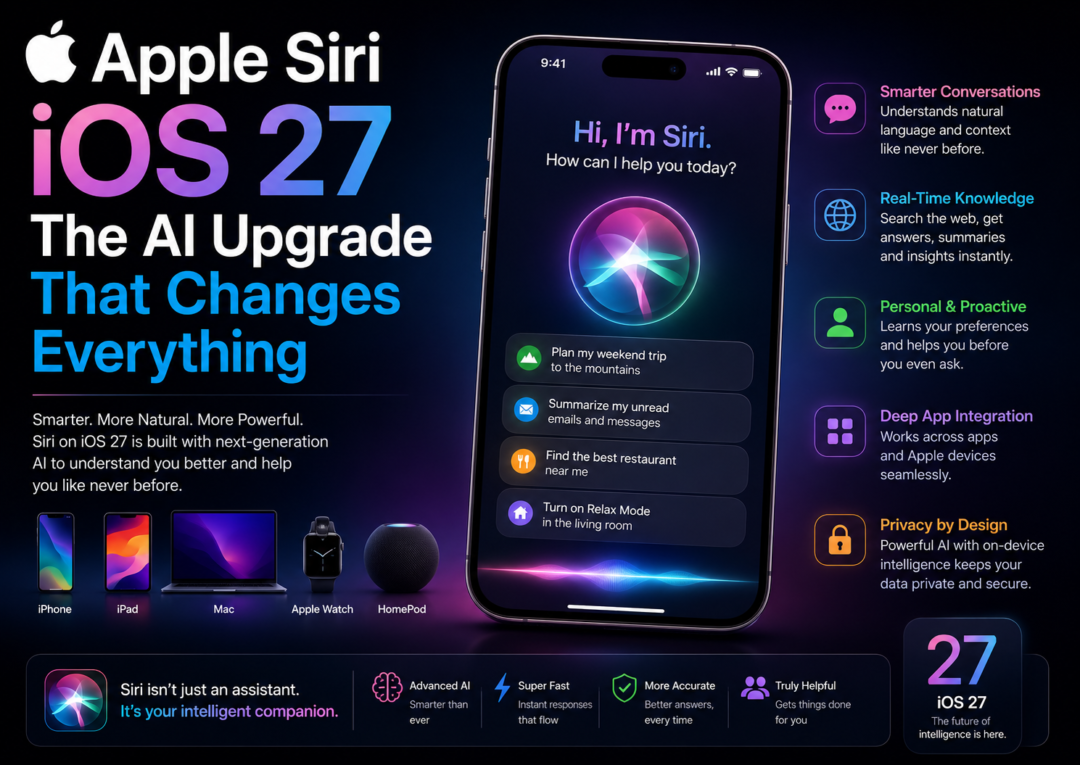
Siri can now work across multiple apps in a single request. “Take the address from my last email from Rahul and add it to the event on Friday” — it reads your email, finds the address, opens Calendar, finds the event, and adds the location. One request. No app switching.
Siri now holds context within a conversation. Ask “Who’s calling me most this month?” Follow up with “And when did I last text them?” It knows who “them” refers to. This sounds simple but it’s the #1 thing that made previous Siri feel broken — every question felt like starting over.
For personal data requests — your messages, photos, notes, health data — Siri reasons entirely on-device using the A-series neural engine. Apple’s Private Cloud Compute handles larger queries without storing your data. In an era of data scandals, this architecture is a genuine differentiator.
The Writing Tools from Apple Intelligence are now much deeper — Siri can rewrite emails in different tones, summarise long message threads, draft replies based on context from the full conversation, and even translate text within any app. It’s like having a quiet editor running in the background.
Ask Siri to “make an emoji of me in a space suit” and it generates a personalised emoji using your Photos. Image Playground lets you create AI images directly in Messages, Notes, or Keynote. These aren’t just fun — they’re tightly integrated into the OS in a way no third-party AI can match.
For queries that go beyond personal data — general knowledge, coding help, creative writing — Siri can optionally hand off to ChatGPT, with your explicit permission each time. No automatic data sharing. You stay in control. It’s a smart hedge that gives Apple the best of both worlds without compromising privacy.
“Apple didn’t just improve Siri. They replaced what Siri was with what AI assistants need to be.”
IndiaThreads Tech Desk — iOS 27 Analysis, June 2026
Siri vs The Competition — Where Does It Actually Stand?
It’s impossible to talk about the new Siri without addressing the elephant in the room: ChatGPT, Google Gemini, and Samsung’s Galaxy AI are already well-established. Has Apple caught up, or are they still behind?
Honestly, it depends on what you’re measuring. For pure raw conversational intelligence and general knowledge queries, ChatGPT-4o is still ahead. Gemini has a depth of Google Search integration that Apple can’t replicate. But for integrated personal context — understanding your actual life, your actual files, your actual apps — Siri in iOS 27 is now best-in-class, and it’s not particularly close.
The Real Comparison — What Matters in Daily Use
- Personal context depth: Siri (iOS 27) wins clearly. Your photos, messages, calendar, health, notes — all processed locally. Competitors can’t touch this without cloud access.
- General knowledge & reasoning: ChatGPT and Gemini still lead here. Siri’s optional ChatGPT handoff is a practical workaround, but it breaks the seamless experience somewhat.
- In-app actions: Siri’s App Intents system is more deeply integrated than any competitor currently offers on iOS. Android’s Gemini has similar ambitions but app coverage is patchier.
- Privacy architecture: Siri wins by a significant margin. On-device processing for personal data is not something Google or Microsoft offers at the same level.
- Speed on-device: Apple Silicon’s neural engine makes on-device Siri responses feel near-instant. Cloud-dependent competitors have latency tied to network conditions.
- Ecosystem lock-in as an advantage: If you’re fully in the Apple ecosystem — iPhone, iPad, Mac, Apple Watch — the cross-device Siri intelligence that iOS 27 enables is genuinely seamless. That’s a moat competitors can’t easily replicate.
The honest summary: Siri in iOS 27 isn’t the smartest AI assistant for every use case. But for Apple users who live inside Apple’s ecosystem, it’s now the most useful AI assistant — because it actually knows your life.
What This Means for Professionals and Power Users
The upgraded Siri isn’t just a consumer feature — it has real implications for how professionals use their iPhones. Here’s the specific change that matters most for each type of user.
For Busy Professionals & Executives
- Email triage gets real: Siri can summarize your unread emails, flag action items, and draft replies — all without you opening Mail. For anyone who deals with 100+ emails a day, this alone is worth the upgrade.
- Calendar management goes hands-free: “Schedule a 30-minute call with Priya next Tuesday after 3 PM, and send her an invite” — one sentence, done. No app opening, no back-and-forth.
- Meeting prep on the fly: Ask Siri to pull up everything relevant to a meeting — the contact’s last messages, related calendar notes, any files you’ve shared — in one request. Seconds before you walk in.
For Developers & Tech Enthusiasts
- App Intents API is now first-class: Xcode integration for Siri intents is cleaner and more capable than ever. Developers can expose specific app features to Siri without deep framework knowledge — and Apple has opened new categories including finance, health, productivity, and more.
- On-device ML benchmarking: Apple Intelligence’s neural engine performance metrics are now much more transparent in developer tools — useful for anyone building ML-adjacent apps.
- SiriKit evolution: The older SiriKit is being deprecated in favour of App Intents, which is more flexible and dramatically simpler to implement. Now’s the time to migrate.
For Students & Creatives
- Writing Tools in Notes is genuinely useful: Not just autocomplete — actual contextual rewriting, tone adjustment, and summarization that works on your existing notes. Students writing papers or summarising research will feel this immediately.
- Image Playground for presentations: Generate custom visuals inside Keynote or Pages without leaving Apple’s ecosystem. Not a replacement for proper design — but surprisingly useful for quick drafts.
- Podcast & media summaries: Siri can now summarize podcast episodes, long articles, or PDF documents you’ve opened on your device. Long academic papers suddenly become a lot more digestible.
The Limitations Worth Knowing
No product launch deserves pure hype. The new Siri is genuinely impressive, but there are real limitations that matter before you go all in.
- Device restriction is a real wall: If you’re on an iPhone 14 or older, you don’t get the full experience. The hardware requirement is non-negotiable — this AI runs on chip, not cloud, and it needs Apple’s latest neural engine silicon to do it.
- Third-party app coverage is still patchy at launch: App Intents requires developers to actively build support. At launch, you’ll find great coverage for first-party apps and major platforms, but many apps you use daily may not have Siri actions yet. Give it 6–12 months.
- It can still make mistakes: Like every LLM-powered assistant, the new Siri hallucinates occasionally — gives confident-sounding answers that are just wrong. For factual queries, always verify. Apple’s Private Cloud Compute does add ChatGPT as a backup, but that’s not foolproof either.
- Regional availability for some features: Full Apple Intelligence availability in all languages and regions is still rolling out. Some Writing Tools and certain Siri capabilities may not be available at launch in non-English languages.
- Battery impact is real on older supported devices: On-device LLM inference is computationally intensive. iPhone 15 Pro users may notice slightly faster battery drain compared to iOS 16 Siri, especially for extended AI tasks. iPhone 16 and later handle this more efficiently.
Final Read:
Siri Finally Grew Up.
Is it the smartest AI assistant available today? For general knowledge and open-ended reasoning, probably not. ChatGPT still leads there. But for people who live in Apple’s ecosystem — and there are billions of them — the new Siri’s ability to reason about your personal context, take actions across your apps, and do all of it privately on-device is a combination no competitor currently offers.
The professionals who’ll get the most out of this update aren’t the ones chasing the smartest AI. They’re the ones who want an AI that actually knows their life — their emails, their calendar, their files, their habits — and can use that knowledge to get things done without five app switches and a web search.
That’s what iOS 27 Siri finally delivers. It took longer than it should have. But it was worth the wait.
Tech Analysis — June 2026