💻 Tech Review | May 2026
The ExpertBook Ultra
Problem:
Too Good
to Pick a Side.
Okay, real talk. Most laptops sold as “business machines” are boring. They’re reliable, yes. They’re professional, sure. But the moment you try to do something fun on them — run a game, push some graphics, use them for anything outside a spreadsheet — they tap out. And gaming laptops? They’re usually the opposite problem: powerful beasts that weigh as much as your carry-on and last about 90 minutes on battery.
The Asus ExpertBook Ultra 2026 is trying to kill that divide — and it’s getting dangerously close to pulling it off. This thing walks into a boardroom and looks the part. Then it quietly handles gaming sessions, heavy creative workloads, and AI-assisted tasks that would’ve needed a desktop two years ago. And it does all of this while fitting under 1.1 kg and lasting a working day on a single charge.
That’s not a marketing line. That’s a genuinely unusual spec sheet. Let’s break down what’s actually going on here — because this laptop deserves a proper look, not just a spec rundown.
What’s Actually Inside This Thing
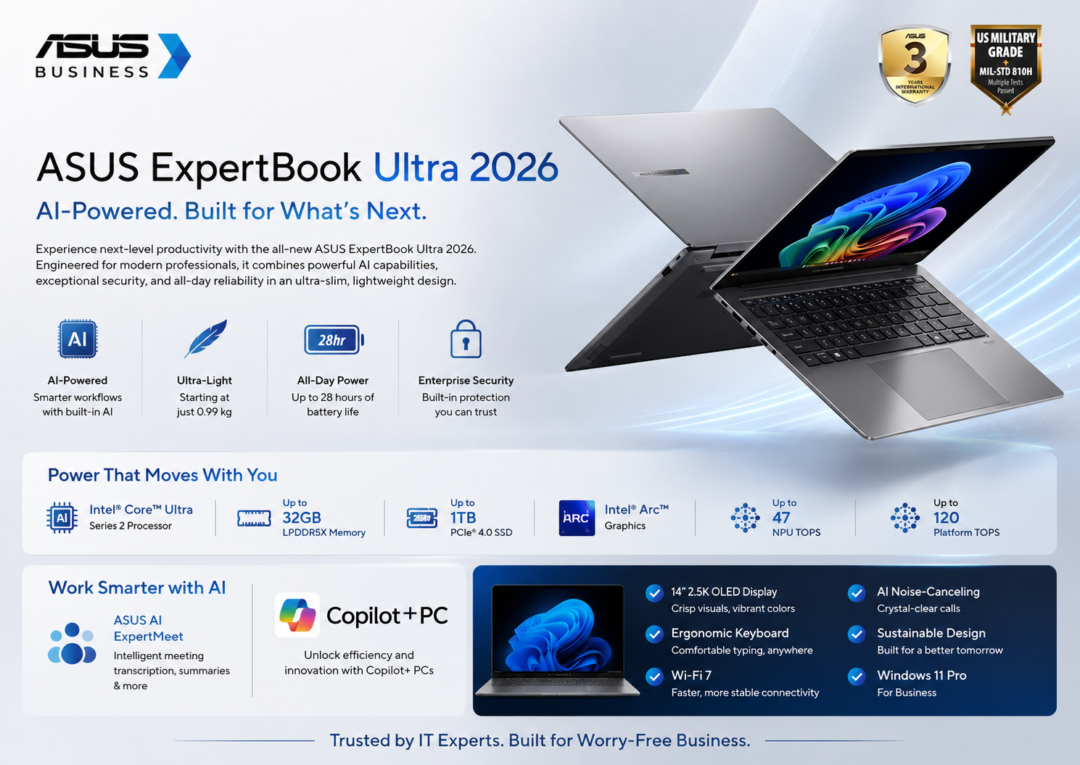
Let’s start with the chip, because everything else flows from it. The ExpertBook Ultra 2026 ships with Intel’s Core Ultra 9 processor — part of the latest generation of Intel’s AI-focused architecture. This isn’t just a faster version of last year’s chip. It’s a fundamentally different approach to how a laptop handles workloads.
The chip has separate performance cores, efficiency cores, and a dedicated Neural Processing Unit (NPU). That last part matters more than most reviews acknowledge. The NPU is why this laptop can run AI-assisted features — real-time transcription, background noise cancellation, live translation, smart frame interpolation in games — without destroying your battery or making the fans spin up like a jet engine.
Graphics come from Intel Arc integrated graphics, paired with optional discrete GPU configurations on higher-end SKUs. Don’t roll your eyes at integrated graphics just yet — Intel Arc has genuinely improved, and for gaming at 1080p with settings tuned reasonably, you’re looking at a surprisingly playable experience on titles that don’t need ultra settings to be fun. More on that shortly.
RAM starts at 32GB LPDDR5X and goes up to 64GB. Storage is NVMe SSD from 1TB. For business users, this means no lag when switching between 40 Chrome tabs, three video calls, and a Figma file. For gamers, it means loading times are near-instant and you’re not constantly waiting for assets to stream in.
The Display Is Where It Gets Real
Okay. Here’s where most “business laptop” conversations end prematurely. Because business laptops historically come with screens that are fine. Accurate enough. Bright enough. And completely forgettable. You wouldn’t choose to watch a film on one. You definitely wouldn’t fire up a game on one and feel anything.
The ExpertBook Ultra 2026 has a 14-inch 2.8K OLED panel running at 120Hz. Let’s sit with that for a second.
OLED means true blacks, insane contrast, and colours that actually pop rather than looking slightly washed out like most IPS panels. 2.8K resolution on a 14-inch screen means it’s sharp enough that you’re not going to see individual pixels. And 120Hz — that’s a refresh rate that matters both for how smooth spreadsheets scroll and how fluid a game feels when you’re playing it.
“A laptop screen that makes you want to use it — not just settle for it.”
ExpertBook Ultra 2026 — Display Category
The display also covers 100% of the DCI-P3 colour gamut. For the business users in the room — that means colour-critical work like photo editing, design work, and video production are viable on this screen. Not just passable. Actually viable. You’re not going to pull something into Lightroom and discover the colours look nothing like what you saw on screen.
For gaming, 120Hz OLED is a genuinely delightful pairing. Fast-moving scenes look smoother. Motion blur is reduced. The pixel response of OLED is faster than IPS by a significant margin, which means competitive games — even at 1080p upscaled — feel more responsive than the specs suggest.
The Gaming Question — Honest Answer
So can it actually game? Let’s be straight about this because the answer is nuanced and “nuanced” tends to get lost in spec-sheet conversations.
Here’s the honest breakdown by game type:
Games like Hades II, Stardew Valley, Among Us, Hollow Knight, Dead Cells, Vampire Survivors — these run beautifully. The ExpertBook handles them without breaking a sweat, and on that OLED display they look genuinely gorgeous. The 120Hz refresh makes everything feel snappy.
CS2, Valorant, League of Legends, Rocket League — games that don’t demand ultra-high graphical fidelity but reward high frame rates — run well at medium-high settings. You’ll hit 60–90 fps in most cases. For the casual-to-moderate competitive player, this is totally playable.
Cyberpunk 2077, Elden Ring, The Witcher 3 — you can run these, but you’re going to drop settings to medium or low and accept 40–60fps. With FSR upscaling it becomes more comfortable, but if you want cinematic ultra settings, this is not your machine. That’s not a surprise — that’s just physics and thermal headroom.
If your gaming identity involves a 4K monitor, RTX 4080, and playing every game on ultra from day one — the ExpertBook Ultra is not your machine. That user needs a dedicated gaming rig. This laptop is for everyone else: the person who games and also needs to work professionally.
Xbox Game Pass cloud gaming on this machine is genuinely excellent. With a good internet connection, you can play GPU-heavy titles streamed at 1080p/60fps. On that OLED screen, it looks fantastic. This significantly extends the ExpertBook’s gaming range without needing the discrete GPU horsepower.
The NPU enables real-time frame interpolation and AI upscaling that improve gaming visuals without proportional GPU cost. Asus’s proprietary software also lets you switch between performance modes — turbo mode for gaming, balanced for work, silent for meetings. The transitions are fast and the profiles are actually useful.
The Business Side — Where It Earns Its Name
The “ExpertBook” name exists for a reason. Asus has a clear professional market in mind here, and the spec decisions throughout reflect enterprise needs as much as raw performance.
🔑 Business Features That Actually Matter
- MIL-STD-810H Military Grade Durability: The chassis passes 12 military-standard tests covering drops, temperature extremes, humidity, and pressure. This isn’t marketing fluff — it means you can throw this in a backpack without a padded laptop bag and still feel reasonably confident. Business travel is rough on devices.
- IR Camera + Windows Hello Face Recognition: Unlocks the moment you sit down. No password typing in airports or conference rooms. The IR camera works reliably in low light conditions, which matters when you’re in a dim hotel room trying to get back to work.
- Fingerprint Reader in Power Button: Another authentication layer, and another moment saved. Small thing, big quality-of-life improvement when you’re unlocking your laptop 40 times a day.
- NumberPad 2.0 on Touchpad: The touchpad doubles as a numerical keypad. You activate it with a dedicated key. For finance professionals, accountants, and analysts — this is genuinely useful and replaces the need for an external numpad on the go.
- AI Noise Cancellation (Bidirectional): The NPU handles real-time noise cancellation for both your microphone and your speaker output during calls. In a busy airport lounge or open-plan office, you sound clear and the person on the other end sounds clear. This works better than most USB microphone solutions.
- Comprehensive Port Selection: Two Thunderbolt 4 ports, USB-A, HDMI 2.1, 3.5mm jack, and microSD slot. You’re not buying dongles. This is a deliberate choice and it matters more than any benchmark for day-to-day professional use.
- Asus Business Manager + TPM 2.0: IT department-friendly from day one. Remote management, hardware encryption, and enterprise security stack integration are handled cleanly. If your company has an IT team, this laptop plays nicely with them.
Battery life is one of the ExpertBook’s real competitive advantages. Asus claims up to 20 hours of mixed use — real-world numbers tend to come in around 14–16 hours for typical business work (documents, video calls, light web browsing). That’s still exceptional. It means a long-haul flight with no charging. It means a full conference day without hunting for a wall socket.
When you need to charge, the 65W USB-C charger is small enough to actually travel with and fast enough to get you from 0 to 60% in about 45 minutes. The laptop also supports charging via any Thunderbolt 4 port, which means your monitor’s USB hub or a hotel TV port can charge you in a pinch.
How It Compares to the Competition
The ExpertBook Ultra doesn’t exist in a vacuum. There are other serious competitors in this “business machine with genuine performance” category, and they’re worth acknowledging.
Who Should Actually Buy This
Not every laptop is for every person. The ExpertBook Ultra 2026 is genuinely excellent — but it’s excellent for a specific type of user. Let’s be honest about that.
Buy it if you are:
- A business professional who travels frequently — consultants, product managers, salespeople, executives. The combination of weight, battery, and professional feature set is best-in-class for travel-heavy roles.
- A hybrid worker who games casually to moderately — if you play games in the evenings or on weekends but don’t want a separate gaming rig cluttering your space, this handles it with dignity.
- A creative professional who needs colour accuracy — designers, photographers, video editors who need a portable machine that doesn’t embarrass them on colour-critical work.
- A student or young professional who can’t afford two devices — one machine that handles university, work, and gaming without compromise is incredibly valuable at this life stage.
- Someone who values all-day battery above everything else — if you’ve been burned by the “8 hours of battery (that actually means 4 hours)” experience, the ExpertBook’s genuinely long battery life is a differentiator.
Think twice if you are:
- A dedicated hardcore gamer — you will always be limited by integrated graphics on demanding titles. Budget for a gaming-specific machine.
- An enterprise IT buyer prioritising existing vendor relationships — ThinkPad’s ecosystem may give you less friction in purely corporate environments.
- Someone who needs a large screen for productivity — 14 inches is genuinely good but some professionals (video editors, data scientists with complex dashboards) need 16+.
Pricing & What You Actually Get
The ExpertBook Ultra 2026 starts at around ₹1,30,000 for the base configuration (Core Ultra 7, 32GB RAM, 1TB SSD, integrated graphics). Top-spec models with the Core Ultra 9, 64GB RAM, 2TB SSD, and discrete GPU options push toward ₹1,80,000–2,00,000.
That’s not cheap. But it’s also not unreasonable when you consider what you’re actually getting: a machine that replaces two separate devices (work laptop + gaming machine), has military-grade durability, a class-leading OLED display, and legitimate professional feature parity with laptops that cost the same or more without the performance headroom.
The real comparison isn’t ExpertBook Ultra versus a cheaper laptop. It’s ExpertBook Ultra versus a decent business laptop (₹80,000) plus a mid-range gaming laptop (₹90,000) — which totals ₹1,70,000 and still requires you to carry two machines. That framing changes the value calculation significantly.
Final Call:
One Laptop. Two Lives.
The Asus ExpertBook Ultra 2026 isn’t trying to be the world’s best gaming laptop. It’s not trying to be the world’s most rugged business machine. What it is trying to be — and what it very nearly succeeds at being — is the best single laptop for the person who refuses to pick just one identity.
The professional who signs contracts in the morning and plays games at night. The consultant who travels every week but still wants a decent Friday evening gaming session. The student who’s applying for jobs and grinding ranked matches in the same evening.
For that person, the ExpertBook Ultra 2026 is genuinely special. Not because it maxes out any single category — but because it navigates all of them with a composure that feels almost unfair at 1.1 kg.
If you’ve been waiting for a laptop that doesn’t make you compromise — this might be the year it actually showed up.
Tech Review — May 2026